
Giving things awayLast reviewed 7 min read
How to take listing photos and write posts that get your stuff rescued
Listing photo tips for giving away stuff: three daylight shots, a plain title, honest condition notes, and what to check after StuffRescue autofill drafts.

A free listing gets rescued when a neighbor can say yes without asking twenty questions. That takes up to three clear daylight photos, a plain title, an honest condition with notes, and a description that makes self pickup easy to plan. On StuffRescue, autofill drafts the details from your photos, and you check them before you list.
In short
- Use up to three photos: the whole item, any flaw, and a label or size shot.
- Shoot in daylight against a plain background, with something for scale.
- Autofill drafts the title, category, description and condition. Every field stays editable.
- Put wear, missing parts, smells, pets and smoke in the condition notes.
- Clearing out a room? Many Items mode turns each photo into its own listing.
What makes a free listing easy to say yes to?
A neighbor looks at your photos, title, category, description, condition and condition notes, and general area, then taps "Rescue this Item." The first to tap gets it, so everything they need to decide belongs in the listing.
Remove the usual reasons people hesitate:
- Clear photos of the whole item and anything a person would ask about.
- A plain title. "Oak bookcase, five shelves" beats "Great find!"
- An honest condition, with any wear explained in the notes.
- Pickup expectations. Every handoff is self pickup, arranged in chat, so mention stairs, weight, or whether it takes two people.
Posting is free, and the giver never pays. Our guide to the free radius and pickup codes explains the handoff.
How many photos should you take, and of what?
StuffRescue needs at least one photo per item and takes up to three (JPG, PNG, WEBP or GIF). Use all three, because each answers a different question:
- The whole item, straight on, nothing cut off. Make this the primary photo.
- The flaw: the scratch, stain or worn corner, up close. No flaw? Show the inside of a drawer or the cushions.
- A label or size shot: a model number sticker, a size tag, or a tape measure across the width.
How do you light and frame a listing photo on a phone?
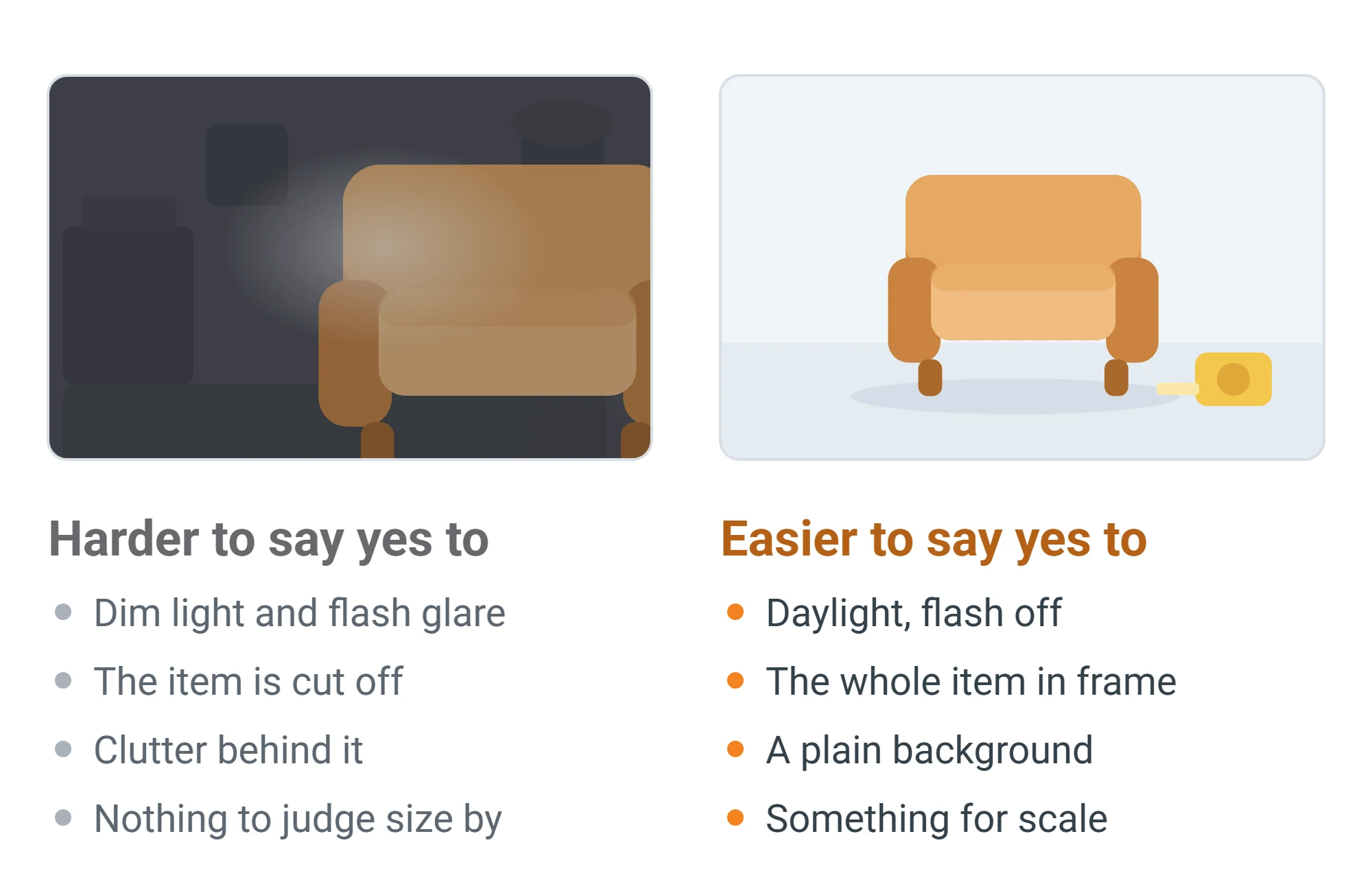
- Use daylight. Work near a window with the flash off; flash glare can hide a scratch or change a color.
- Pick a plain background, like a bare wall, and clear the clutter.
- Hold the phone level at about the middle height of the item.
- Fill the frame, but keep the whole item in the first shot.
- Add something for scale, such as a kitchen chair or a tape measure.
- Wipe the lens and keep the sharpest of a few shots.
What does autofill fill in, and what should you check?
Open the post form
Tap the orange + button to open "Rehome an Item." One Item is the default.
Add your photos
On a phone, use Take Photo or Gallery. On a computer, use Choose Photos or Add from Phone.
Check each field before you list
Autofill reads your photos together and drafts the title, category, description, condition and condition notes.
When it isn't sure, it asks for a clearer photo or fills nothing in, leaving category and condition on their defaults, Miscellaneous and Good.
Autofill only knows what the camera shows, so check:
- Title: add brand, size or color if it matters.
- Category: one of 14, from Furniture and Baby & Kids to Office Supplies and Miscellaneous.
- Description: add measurements, whether it works, and pickup notes.
- Condition: a photo can't show whether a lamp switches on. The form starts at Good, so change it if that isn't true.
- Condition notes: autofill may draft these from what it sees; add what the camera can't show, like a smell, pets or smoke in the home, or a part that doesn't work.
How do you describe condition honestly?
Every listing has one of five conditions. This rule of thumb is ours, not an official one:
| Condition | Rule of thumb | Say in the condition notes |
|---|---|---|
| New | Never used | Opened box, missing manual |
| Like New | Used briefly, no visible wear | Anything that isn't perfect |
| Good | Used and working, light wear | Where the scuffs or fading are |
| Fair | Works, with obvious wear or a small problem | The problem and whether it affects use |
| For Parts / Not Working | Broken, incomplete or untested | What's broken and what still works |
The condition notes field says it plainly: "Be honest! It helps the next person know what to expect." Its example, "Small scratch on the side, missing original box," is a good model.
StuffRescue doesn't inspect items; the person listing is responsible for each item's safety, condition and legality. A surprise at the door can end in a canceled rescue and a wasted trip for you both. Our rescuer guide to what to check before picking up free furniture shows what they'll look for.
How do you list a whole clean-out at once?
If the form offers a choice between One Item and Many Items, choose Many Items. The rule is simple: one photo is one item. Photograph 15 things and you get 15 listings; a batch holds up to 15 by default.
- One thing per photo. A crowded shelf becomes a single listing. Photograph a matching set of chairs together so it lists as one.
- Add angles afterward. Each item can take extra photos later, up to three in total.
- Review every listing. Autofill can't see a cracked back panel or a missing leg.
To change a listing later, go to My Stuff, My Library, then Edit. For big pieces, see getting rid of a couch in Akron for free.
What should you keep out of your photos and posts?
Rescuers see your neighborhood, not your address, and chat keeps your email and phone private. Don't undo that in your photos:
- House numbers and street views. Shoot indoors when you can.
- Mail and packages, which carry your name and address.
- License plates, easy to catch in the driveway behind a bike or mower.
- Faces, including family photos on the wall.
- Contact details. Those go in chat after a rescue.
Before you list
- To do: Whole item, flaw, and label or size photos
- To do: A plain title and a condition you set yourself
- To do: Condition notes and measurements
- To do: No house numbers, mail, plates or faces in any photo
- To do: Baby gear checked against CPSC recalls
Frequently asked questions
Do I need a photo to post on StuffRescue?
Yes. Every listing needs at least one photo.
Can I edit what autofill wrote?
Yes. Every field stays editable, and anything you type while autofill runs is kept. If it isn't sure, it fills nothing in: the title and description stay empty, and category and condition stay on their defaults (Miscellaneous and Good) until you change them.
How many photos can I add to one item?
Up to three, and you choose the primary one. In Many Items mode each photo starts its own item, and you can add angles afterward.
Can I post from my computer if my photos are on my phone?
Yes. Choose Add from Phone, scan the QR code with your phone's camera, and the photos upload straight to the form.
Sources
Published by StuffRescue, a US nonprofit based in Akron, Ohio. Spotted something out of date? Email info@stuffrescue.co.
More guides on giving things away
Giving things away
How to Give Away Furniture for Free (and Actually Get It Picked Up)
Learn how to give away furniture for free, arrange a safe pickup, and compare donation options like local charities, StuffRescue, and bulk trash
Giving things away
How to get rid of a couch in Akron without paying to haul it
How to get rid of a couch in Akron: give a usable one to a neighbor who picks it up, or put a worn-out one out for city large-item pickup.
Helping survivors & shelters
How Domestic Violence Advocacy Organizations Actually Source Household Goods for Survivors
How domestic violence shelters get donations in Ohio: the real mix of drives, wishlists, vouchers, and partnerships advocates use — and what's changing.